Use Reset File Associations  to reset the file associations for embroidery files, embroidery design files, cross stitch files, and family tree files.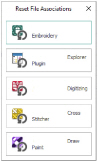
This may be required if other embroidery software or Explorer plugins are installed after the mySewnet™ Embroidery Software or mySewnet™ Explorer Plugin.
In the Reset File Associations dialog box, click the button for the file type for which you want to reset the file association.
In Windows® 10 and 11, you will need to manually reset the file associations. See "In Windows® 10 or 11, when I click Reset File Association a Windows® message appears.".