Use the Modify window to adjust the stitching, change the shape and size of an embroidery, split an embroidery, insert color, stop and trim commands, add a cutwork needle line, and emboss an area of stitching.
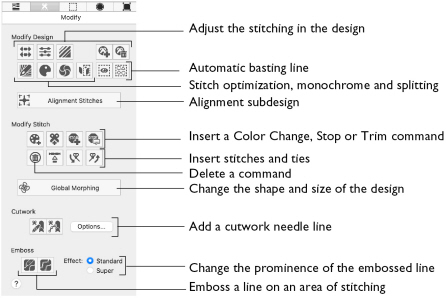
To Open the Modify Window
-
Click Control Panel, then click Modify
 .
.
|
To learn how to |
Go to |
|---|---|
|
Change the shape and size of a design |
|
|
Compensate or break up stitches |
See Compensate Stitches and Break Up Stitches. |
|
Optimize the stitching |
See Density Advisor and Stitch Optimizer. |
|
Add trims to an embroidery |
See Automatically Add Trim Commands and Insert Trim Command. |
|
Insert a Color Change |
|
|
Insert a Stop command |
|
|
Insert Stitches and Ties |
See Insert Stitches and Inserting Tie Stitches. |
|
Add a cutwork needle line |
|
|
Emboss an area of stitching |
|
|
Break an embroidery into two parts |
|
|
Add a border or appliqué |